Custom Search
Showing posts with label My Personal Gadgets. Show all posts

Thursday, January 29, 2009

Terratec Cinergy HTC USB XS HD - Sample JPEG Image Capture

Sponsored Links

This is a sample JPEG Image Capture video using Terratec's Cinergy HTC USB XS HD TV Tuner.
Info
File Sizes: 90 - 100 KB
Width: 1024
Height: 576
Horizontal Resolution: 96 dpi
Vertical Resolution: 96 dpi
Format: JPEG


If you want a sample recorded video (raw format is AVI) with Terratec inergy HTC USB XS HD, please watch this.

If you want a sample recorded video (raw format is MPEG) with Terratec Cinergy HTC USB XS HD, please watch this.

Please feel free to comment ^_^

Other Posts:


Monday, January 26, 2009

Terratec Cinergy HTC USB XS HD - Sample Recorded MPEG Video

Sponsored Links

This is a sample recorded video using Terratec's Cinergy HTC USB XS HD TV Tuner.

Info
Duration: 65 seconds
Original File Size: 45,992 KB
Raw Format: MPEG


If you want a sample recorded video (raw format is AVI) with Terratec Cinergy HTC USB XS HD, please watch this.

If you want a sample JPEG Image Capture with Terratec Cinergy HTC USB XS HD, please watch this

Please feel free to comment ^_^

Other Posts:


Friday, January 9, 2009

Terratec Cinergy HTC USB XS HD - Sample Recorded AVI Video

Sponsored Links

This is a sample recorded video using Terratec's Cinergy HTC USB XS HD TV Tuner.

Info
Duration: 26 seconds
Audio Format: PCM
Frame Rate: 25 frames/second
Resolution: 720x480
Raw Format: AVI


If you want a sample recorded video (raw format is MPEG) with Terratec Cinergy HTC USB XS HD, please watch this.

If you want a sample JPEG Image Capture with Terratec Cinergy HTC USB XS HD, please watch this

What do you think? Comments are very welcome ^_^


Other Posts:


Wednesday, December 31, 2008

My Terratec Cinergy HTC USB XS HD Review

Sponsored Links

I have just recently purchased a USB TV Tuner from Terratec this month and it cost 99 Euros. The Terratec Cinergy HTC USB XS HD and here are its specs:


Features
- DVB-T (DTT, Freeview), DVB-C and analogue TV and radio receiver
- Remote control and antenna included
- Breakout cable video input/audio input
- Video Codecs: MPEG 2, MPEG 4 / H.264 for HD
- Audio Codecs: AC3 Dolby Digital, MPEG Audio
- Digital video recorder
- EPG, Teletext and TimeShifting
- Picture in Picture within a transponder
- Browser TV
- USB 2.0 compatible
- Power supply via USB


General
- Plug’n’Play
- Voltage: 5V DC (USB bus powered)
- Current: 480mA
- Housing colour: white/grey
- Dimensions: 80 x 30 x 15 mm (wide x height x deep)
- Weight: 30 gramm

Infrared remote control
- 48 buttons
- Weight: 82 gramm (incl. batteries)
- 2xAAA batteries

System requirements
- 2.0 GHz Intel or AMD CPU
- 1024 MB RAM
- Windows XP SP2 / Vista
- 1 available USB 2.0 interface
- 300 MB free hard drive space for software installation
- Direct-X-compatible audio hardware
- Direct-X-compatible video card with video overlay function
- CD/DVD drive for driver/software installation
- CD/DVD drive for creating CDs/DVDs

System recommendation for HDTV reception
- Dual Core Intel or AMD CPU for HDTV decoding
- 1024 MB RAM (Win XP) 2048 MB RAM (Win Vista)
- Graphics card with hardware acceleration for HDTV
- Terrestrial digital TV reception (DVB-T, Freeview, TNT) with HD resolution

Software
- TerraTec Home Cinema
- MAGIX Movies on CD & DVD TV Edition
- Codec set for HDTV


This is my first time using a TV Tuner to both my Laptop and my Desktop so I can't really compare which brand is better or what is the best brand. So I will just compare the video quality of my 23 inch DELL LCD (with the Cinergy TV Tuner stick) and my old 32 inch GRUNDIG CRT TV.

The video quality of my GRUNDIG CRT TV is better than my DELL LCD. I am not surprised about this because in my opinion, LCDs can't beat the CRTs in terms of Video Quality as of now. If I say my GRUNDIG's video quality is 10 out of 10, I say that my DELL LCD (with the Cinergy TV Tuner stick)'s video quality is 8 out of 10. I think this is not bad for an LCD Monitor using only a USB TV Tuner.

The channel scanning only took 5 to 10 minutes and it detected all 60+ channels that my GRUNDIG shows. I also have no problems with my Remote Control. Every button works as I have expected. Pressing the power button would turn on or off the TV Tuner Software. Pressing the record button will record the show. I could also change channels while I am recording a specific channel (I love this feature ^_^).

I think that with a PCI TV Tuner Card the video quality would be better than a USB. But unfortunately I didn't find a PCI TV Tuner Card that is capable of DVB-C and DVB-T that I like. (BTW, the connection type in my place is DVB-C but I have heard from the news that Germany plans to implement DVB-T in All of Germany, so I decided to buy a Hybrid TV Tuner) I chose this product not because I have no choice but because it is just a USB Stick so I could use it with my laptop and my desktop (unlike PCI cards where you have to open your pc case) anytime I want. It is portable and handy.

The only 1 problem (which I solved immediately) was when I first installed the device. The remote control is working, the software is running fine, it scanned and detected both TV and FM channels. But after 5 minutes of viewing a channel (any channel) , the software will start to freeze and hang and then display a "NO SIGNAL" message. I searched Terratec's site for solutions and immediately noticed that they have an updated driver available. The driver version in the Installation CD is 5.8.0430.0. The updated driver version is 5.8.630.0. I installed the latest driver and it worked! So if you have encountered this problem please do not decide immediately to return the product as the solution is very simple. Just update the driver.

Overall I was very satisfied with Terratec's Cinergy HTC USB XS HD TV Tuner. I have not encountered any other problems so far (except for the problem above) and I am still playing and experimenting with its features and possibilities.

Which TV Tuner did or have you purchased? Is the Video Quality good? Have you encountered major problems with the product? Was it fixed? Please share your ideas or experiences. ^_^

[Update January 15, 2009]
If you want a sample recorded video (raw format is AVI) with Terratec Cinergy HTC USB XS HD, please watch this.

[Update January 29, 2009]
If you want a sample recorded video (raw format is MPEG) with Terratec Cinergy HTC USB XS HD, please watch this.

[Update January 29, 2009]
If you want a sample JPEG Image Capture with Terratec Cinergy HTC USB XS HD, please read this post.

Other Posts:


Tuesday, December 30, 2008

Problems, Fixes and Workarounds with My HP Pavilion dv9000 (dv9015ea)

Sponsored Links

Do you have problems with your HP Pavilion dv9000 laptop?
Do you know how to fix these problems?
Do you have solutions?
Do you have workarounds with this problems?

If you searched the internet for HP Pavilion dv9000 laptop problems, you will find hundreds or even thousands of people complaining:
- Laptop screen freezes at certain points in the opening of the laptop.
- Laptop is on but it just shows plain black.
- Laptop does not detect wireless networks and the wireless adapter is not detected in the Device Manager.
- Laptop has no power and no active LEDs.
- Laptop does not start.
- The battery charge indicator light does not turn on when the battery is installed and the AC adapter is connected.
- Laptop issues a single beep during boot indicating no power.
- There is no video on the computer LCD panel or external monitor.
- The external monitor functions but there is no image on the notebook LCD panel.

I have experienced almost all the problems listed above. After 1.5 years of using it, the first problem that I have encountered was there was no display when I turned on my laptop. The hard disk was running but still no display. I called HP and then shipped it. Thank God that time I still have 6 months before my WARRANTY ENDS. I made a follow-up call and they told me that the motherboard was the problem. After 2 weeks I received it with a new motherboard and I also found out that they have updated the BIOS to version F.3D (which HP recommends when you have experienced the problems listed above).

I was so happy that it turned on and have no problems so far. After 9 months, the problem "rose" again. There was no display when I turned on my laptop! And the additional problem was my WARRANTY already ended. I tried to search the internet for fixes. I tried updating its drivers and even tried reformatting my laptop but still it did not fix the NO DISPLAY problem.

After 2 days of misery, I have found simple ways to fix it. Actually not fixes but WORKAROUNDS so that the problem will not "rose" again.

Problem 1: No display when turning on laptop.

My Workaround 1: Half opening the laptop before turning it on (see screen shot). Open the laptop fully (or the way you like) only when it has already booted on Windows completely (not the screen with the Windows Progress Bar).

I only suspected that the video card was the problem because of the reason that there is no display. I thought that there maybe a "loose contact" between the Video Card and the LCD. The first thing I did before I came up with this solution is that I tried several opening positions prior to turning the laptop on. 15°, 30°, 45°, 60°, 75° and 90° opening (just approximations). And I discovered that opening the laptop between 45° to 75 ° before turning on the laptop solved the NO DISPLAY problem, 100% based on my experience.

When I played Warcraft III, I heard a sound (like when you disconnect a device sound in Windows) and the Warcraft display was tiled 3 times. I went out to the Windows screen (pressing Windows button), half opened the laptop, and I heard a sound(like when you connect a device sound in Windows). I went to Warcraft Screen and it displayed normally! It was like the Video Card disconnected and reconnected back. I know it sounds weird but these were my observations.


Problem 2: Still no display when turning on laptop while trying My Workaround 1.

My Workaround 2: After turning on laptop , press Escape Key after 5 seconds.

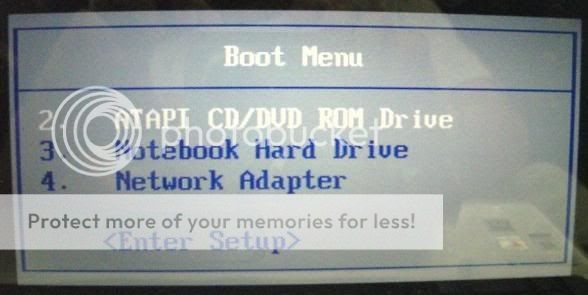
After 2 weeks of trying My Workaround 1, the NO DISPLAY problem "rose" again. I came with this solution when I tried going to BIOS because I thought there might be boot settings that could help this problem (which unfortunately did not help). There was no display so I pressed the Escape Key several times and out of misery left my laptop. After 10 to 20 minutes of waiting, the LCD turned on and showed the "Boot Menu" Screen. I chose Notebook Hard Drive and it booted!

Problem 3: Laptop screen freezes at certain points in the opening of the laptop and even after Windows booted completely.

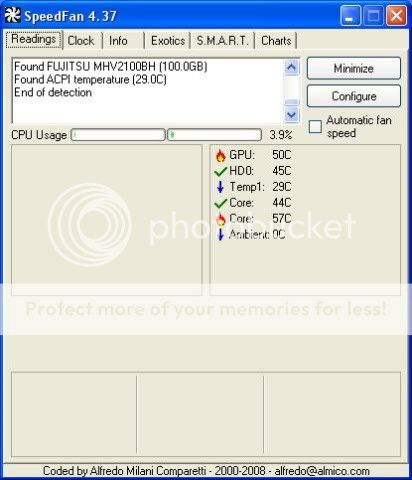
My Workaround 3: I keep my laptop propped up so that the video card will not get hot easily (see screen shot).

I came up with these solutions when I tried to check the temperature of the Video Card (see the "butt" side of your laptop, it is on the upper left side, or when you are using your laptop, it is on your upper left side just below your speakers). I tried to check the temperature of the laptop's hardware using Speed Fan version 4.37. The temperature of the Video Card ("GPU" in the screen shot) was 63° Celsius. I turned off the machine, propped up the laptop using a cardboard stand (which I made myself, sorry for the very bad design.hehe), and restarted the machine. The machine started flawlessly without hangs or freezes. I ran Speed Fan and the temperature dropped to 10-13° Celsius!

Until now, I am still using my laptop using the workarounds listed above without any problems (I used my laptop writing this blog ^_^ and I am currently still saving money to buy a Laptop Stand with Cooler).

Have you discovered ways, fixes or workarounds with your HP notebook?

So that's it. Problems, Fixes and Workarounds with My HP Pavilion dv9000 (dv9015ea). It worked for me. It might work for you. ^_^ Good luck! ^_^

Other Posts:


Saturday, December 27, 2008

My HP Pavilion dv9000 (dv9015ea) Review

Sponsored Links

I have purchased this laptop last September 2006 and I am still using it until now. I have chosen this laptop as a desktop replacement.

Before I tell you my Pros and Cons with my HP Pavilion dv9000 laptop (dv9015ea), here is its complete specs:

HP Pavilion dv9000 Laptop Full Specs:
Microprocessor: AMD Turion™ 64 X2 Mobile Technology TL-50
Microprocessor: Cache Level 2 cache 256 KB + 256 KB
Memory: 1024 MB DDR2 667 MHz (2 x 512 MB)
Video Graphics: NVIDIA® GeForce™ Go 7600
Video Memory: 256 MB (dedicated)
Hard Drive: 2 x 100 GB 5400 rpm
Multimedia Drive: Super Multi DVD Writer (+/-R +/-RW) with Double Layer support
Display: 17" WXGA+ High Definition BrightView Widescreen (1440 x 900)
Fax/Modem: High speed 56K modem
Network Card: 10/100 LAN Ethernet integrated
Wireless Connectivity: 802.11a/b/g WLAN
Sound: Altec Lansing® speakers
Keyboard: Full size desktop keyboard (with separate numeric keypad layout)
Pointing Device: Touch Pad with On/Off button and dedicated vertical and horizontal Scroll Additional Button: Up/Down pad, volume control, mute buttons, 1 Quick Launch Button
External Ports:
- 5-in-1 integrated Digital Media Reader for Secure Digital cards, MultiMedia cards, Memory Stick, Memory Stick Pro, or xD Picture cards
- 1 VGA port
- 4 USB 2.0 ports
- 1 IEEE-1394
- 1 RJ 11 modem connector
- 1 RJ 45 Ethernet connector
- S-video TV out
- Remote control infrared port (Remote Control optional)
- 2 Headphones-out one w/ SPDIF Digital Audio, 1 Microphone-in port
Dimensions: 28.50 cm (L) x 39.60 cm (W) x 3.16 cm (min H) / 4.18 cm (max H)
Weight: 3.56 kg (7.8 lbs)
Power:
- 65 W AC Power Adapter
- 8-cell Lithium-Ion (Li-Ion) battery
Operating System: Genuine Windows XP Home Edition
Security and Support: HP Pavilion recovery partition (including possibility to recover system, applications and drivers separately)

Pros and Cons of My HP Pavilion dv9000 (dv9015ea)

Pros:
- A very good laptop as a desktop replacement. It has a good design.
- 1 Gig RAM
- The NVIDIA GeForce Go 7600 is a middle class video but most 2006 games and later runs smoothly on this machine.
- The notebook is fast in terms of performance and speed but it gets hot easily.
- The built in web cam is great for using YM or Skype.
- It is not a gaming computer but I have been able to install and use Photoshop, VMWare and other intensive programs. I have been normally running at the same time Comodo Firewall, Winamp/VLC Media Player, Firefox, Opera, Avira, Photoshop, but I see no problems as it handles multi-tasking well.

Cons:
- This laptop is heavy BUT excellent as a desktop replacement.
- For only about an hour of usage you can feel that it is already getting hot and I am planning to buy a cooling pad.
- The battery life is so short. Now, A fully charged battery can last only an hour and 30 minutes or so.
- Sometimes the monitor would show nothing, no display.
- As I have searched through the web regarding HP Pavilion dv9000 problems, there are so many very unhappy customers because of HP Support and the product itself.
- Right now, my wireless card is not working anymore. I have only used it once.

As you can see, you might think that you will not buy an HP laptop anymore because of the Cons I have said. Personally, I would still buy an HP laptop in the future. If you search the web regarding problems with Dell, Acer, IBM, Asus, Sony, Toshiba, Lenovo and other brands, I am sure you could also find big drawbacks with these machines. In the end, your choice depends on Price/Budget, Reviews, Personal Preferences, Needs and Experiences.

I have experienced the very famous No Display Problem with my HP but luckily I have found ways in fixing it. If you want to know how just read this post.

Other Posts:


Custom Search