Custom Search
Showing posts with label Free Software. Show all posts

Friday, January 16, 2009

Why Firefox and Opera are better than Google Chrome as a Blogger?

Sponsored Links

Is Google Chrome buggy? No.
Is Google Chrome slower? I did no testing.
What is the disadvantage of Google Chrome compared to Firefox and Opera?

Since I am a Google fan, I tried using Google Chrome (especially the Incognito Mode. Surfing, downloading, searching, browsing, and video streaming worked just fine like Opera and Firefox. When I login to my Blogger account and tried changing the layout of my blog (Layout -> Edit HTML), a problem came (not really a problem but rather an inconvenience for me as a Blogger).

Do you know what the problem really is with Google Chrome if you are a Blogger and you want to change your layout?

Google Chrome's Browser Search function. (do not misunderstand this as Google Search)

When I tried searching for the word "body" (not body of a woman but the HTML tag), Google Chrome did not find the word. I restarted Google Chrome thinking that it might just be the solution but still it could not find the word I was looking for. I was thinking that Google Chrome's Search Function is buggy. I tried searching other tag such as "head" but still it was not working. Then I searched for the word "html" and now it worked but only yielded 1 result, "Edit HTML".

Because of that, I have concluded that Google Chrome's Search Function could not search text inside the CODE BOX. Opera and Firefox can.

This is the only reason why I use Opera or Firefox over Google Chrome, again if I try to do changes to my layout. It was very inconvenient for me as a Blogger user to search the code manually just looking for the word "body" or "HeaderColor". But I believe Google will fix this in their next software release.

I still use Google Chrome for surfing but use Firefox or Opera when I login to my Blogger account. But I personally recommend Firefox. Please read this post to know why I use Firefox, again if I try to do changes to my blog layout.

Other Posts:


Why I choose Firefox rather than Opera or Google Chrome as a Blogger?

Sponsored Links

Since I joined Blogger, I always use Firefox simply because I am satisfied using it. Curios about what the other popular browsers have to offer, I tried using Opera and Google Chrome.

But I was not satisfied using Google Chrome when I tried to edit my blog layout. If you want to know why I don't use Google Chrome, please read this post.

What I am going to tell you is the Search Function comparison between Firefox and Opera.
When you do a search using Opera (pressing "CTRL + F"), it will launch a new window. If you want to search the next or previous word, you have to select Search up or Search down, and then click Find Next.

In Firefox, searching is simple. A search bar will just appear below (pressing "CTRL + F"). If you want to search the next or previous word, you only have to click Next or Previous button.

You also have the option to Highlight all the text found. This is very useful especially when you have manually added your adsense code to your layout. You just have to search "google_ad", click Highlight all, and you just have to browse for the highlighted text.

What browser do you use when you do some changes to your blog layout?
Have you used other browsers which have better Search Funcionality than Firefox?

Other Posts:


Friday, January 9, 2009

Google Chrome - Incognito Mode

Sponsored Links

What is Google Chrome?
What are its features?
What is Incognito Mode?

Google Chrome is a web browser. Just like Internet Explorer, Firefox and Opera. I tried using this browser simply because I am a Google Fan.

- If you want to navigate, just type directly into the address bar and it will suggest popular sites and the pages that you have already visited (same as Firefox with the Google Toolbar).

- If you want to open a new tab, just click on the "+" icon (same as the latest Opera browser). You can also arrange the tabs the way you want (same as Opera and Firefox).

- Very important feature: Chrome's Task Manager lets you view your opened tabs. If there is a tab or a page that hangs, just right click the misbehaving page and click "End Process" (same as the Windows Task Manager but it is better because you don't need to close the whole application, just the misbehaving tab or page).

- My favorite feature, the Incognito Mode (it seems that the logo is like Linux Redhat). During Incognito Mode, you can browse the web without storing any data or record on your computer. The pages you have visited, browser and search history, and cookies will be deleted after closing the Incognito Window. But note that the files you have downloaded and the sites you have bookmarked will not be deleted.

This feature is very "useful" when you want some privacy. Like when you want to research about your "school projects" and don't want your younger brother or sister and parents to know what you are doing. Stuffs like that, you know what I mean ^_^

But be careful when you are using Incognito Mode. For me, Incognito Mode is good to use when you are just at home. But when you use it in your office, you might loose your job. Except when you are the head of the IS/IT department. Again, you know what I mean ^_^

I know you will download Google Chrome because of the Incognito Mode feature. Am I right? ^_^

Other Posts:


Tuesday, January 6, 2009

WinRar, Winzip or 7-Zip?

Sponsored Links

Which is faster? WinRar, Winzip or 7-Zip?

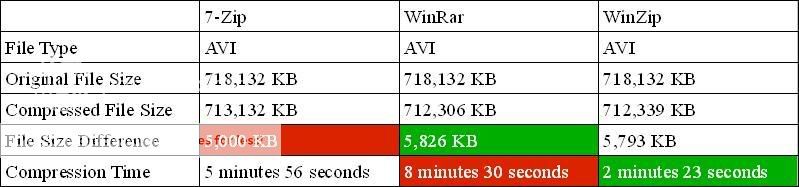
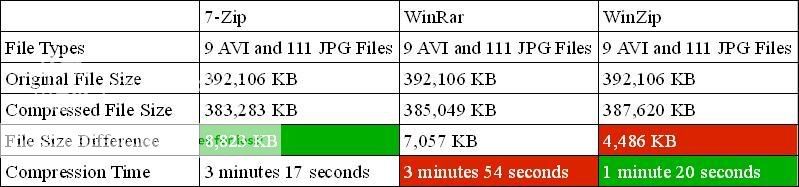
First of all, I would like to say that I used this machine when performing this test. I did not change any setting when using these compression softwares. I just used their default compression settings. I have no other applications running. No anti-virus or anti-spyware program. No background processes. Just the Windows System files necessary to load the OS.


Single File Compression

File Size Difference: WinRar > Winzip > 7-Zip
Compression Time: Winzip > 7-Zip > WinRar


Multiple Files Compression

File Size Difference: 7-Zip > WinRar > Winzip
Compression Time: Winzip > 7-Zip > WinRar

So which compression software should I choose?
I can't really answer this question directly. As the comparison shows the compression speed of WinZip is far greater than 7-Zip and WinRar. But 7-Zip and WinRar's file compression is better than WinZip. But the tables above might help you decide.

I am sure that there are still other compression softwares that are better than these 3. The performance of the software depends on many factors such as processor, file types, number of files compressed etcetera. I used WinZip before but I am using 7-Zip now because I am satisfied with it and is completely FREE! ^_^

Other Posts:


Custom Search